3D density maps
Three-dimensional representations of the distribution functions can also be obtained from the MDDF results. These 3D representations are obtained from the fact that the MDDFs can be decomposed into the contributions of each solute atom, and that each point in space is closest to a single solute atom as well. Thus, each point in space can be associated to one solute atom, and the contribution of that atom to the MDDF at the corresponding distance can be obtained.
A 3D density map is constructed with the grid3D function:
ComplexMixtures.grid3D — Function
grid3D(
    result::Result, atoms, output_file::Union{Nothing,String} = nothing;
    dmin=1.5, dmax=5.0, step=0.5, silent = false, type = :mddf, molecule = 1,
)
This function builds the grid of the 3D density function and fills an array of mutable structures of type Atom, containing the position of the atoms of grid, the closest atom to that position, and distance.
Positional arguments
resultis aComplexMixtures.Resultobjectatomsis a vector ofPDBTools.Atoms with all the atoms of the system.output_fileis the name of the file where the grid will be written. Ifnothing, the grid is only returned as a matrix.
Keyword (optional) arguments
dminanddmaxdefine the range of distance where the density grid will be built, andstepdefines how fine the grid must be. Be aware that fine grids involve usually a very large (hundreds of thousands points).silentis a boolean to suppress the progress bar.typecan be:mddf,:coordination_number, or:md_count, depending on the data available or desired from the results.molecule: if the solute is composed of more than one molecule (for example, glycerol in a water/glycerol mixture), the grid is built around this molecule of the solute (the first one, by default). The contributions are those of each atom of a single solute molecule, averaged over all molecules, and the grid is built around the structure of the chosen molecule inatoms.
The output PDB has the following characteristics:
- The positions of the atoms are grid points.
- The identity of the atoms correspond to the identity of the protein atom contributing to the property at that point (the closest protein atom).
- The temperature-factor column (
beta) contains the relative contribution of that atom to the property at the corresponding distance. - The
occupancyfield contains the distance itself.
Example
julia> using ComplexMixtures, PDBTools

julia> atoms = read_pdb("./system.pdb");

julia> R = ComplexMixtures.load("./results.json");

julia> grid = grid3D(R, atoms, "grid.pdb");
Examples of how the grid can be visualized are provided in the user guide of ComplexMixtures.
ComplexMixtures.volumetric_data — Method
volumetric_data(grid::AbstractVector{<:PDBTools.Atom}; sigma=0.0, step=nothing, value=PDBTools.beta)Converts the grid computed by grid3D into volumetric data (a PDBTools.VolumetricData object), that is, the values of the contributions on a regular (dense) grid. The positions of the regular grid that are not grid points of grid3D are filled with zeros.
The volumetric data can be displayed as isosurfaces with PDBTools.visualize, or written to a file in the OpenDX (.dx) format with PDBTools.write_dx, to be loaded in other visualization software (VMD, PyMOL, ChimeraX).
Keyword (optional) arguments
sigma: width (in Å) of the Gaussian function used to smooth the data. Withsigma=0(default), the data is not smoothed. The values of the grid ofgrid3Dare the contributions of the closest solute atom to each point, thus they change abruptly between neighboring points that are closest to different atoms. Smoothing (withsigmaof the order of the gridstep) produces continuous isosurfaces. Smoothing preserves the sum of the values, thus the maximum value decreases withsigma.step: the spacing of the grid. By default, it is obtained from the positions of the grid points, which must be the samestepused ingrid3D.value: the function that returns the value associated to each grid point. By default, it is thebetafield, which contains the relative contribution of the closest solute atom to the property at that point.
Example
julia> using ComplexMixtures, PDBTools

julia> atoms = read_pdb("./system.pdb");

julia> R = ComplexMixtures.load("./results.json");

julia> grid = grid3D(R, atoms; dmin=1.5, dmax=3.5);

julia> density = volumetric_data(grid; sigma=0.5);

julia> write_dx("density.dx", density) # write the data to a file

julia> visualize(select(atoms, "protein") => (;), density => (isovalue=0.05,)) # isosurface of the dataThe call to grid3D will write an output a PDB file with the grid points, which loaded in a visualization software side-by-side with the protein structure, allows the production of the images shown. The grid.pdb file contains a regular PDB format where:
- The positions of the atoms are grid points.
- The identity of the atoms correspond to the identity of the protein atom contributing to the property at that point (the closest protein atom).
- The temperature-factor column (
beta) contains the relative contribution of that atom to the property at the corresponding distance. - The
occupancyfield contains the distance itself.
The "property" is, by default, the MDDF. Coordination numbers or minimum-distance counts can be used by setting the type keyword parameter.
For example, the distribution function of a hydrogen-bonding liquid solvating a protein will display a characteristic peak at about 1.8Å. The MDDF at that distance can be decomposed into the contributions of all atoms of the protein which were found to form hydrogen bonds to the solvent. A 3D representation of these contributions can be obtained by computing, around a static protein (solute) structure, which are the regions in space which are closer to each atom of the protein. The position in space is then marked with the atom of the protein to which that region "belongs" and with the contribution of that atom to the MDDF at each distance within that region. A special function to compute this 3D distribution is provided here: grid3D.
Interactive visualization
The grid, and the atomic contributions to the MDDF, coordination numbers, or KB integrals, can be visualized interactively with the visualize function of PDBTools, which renders 3D views with 3Dmol.js. The views are displayed in the VSCode plot pane, in Pluto and Jupyter notebooks, and in this page (rotate, zoom, and hover over the atoms to identify them). In the Julia REPL, the views are opened in the web browser, and they can be saved as standalone HTML files with save("view.html", view).
The visualize function is available in PDBTools 3.40.0 or greater. Showing groups of atoms with different representations in the same view, as done here, requires PDBTools 3.41.0 or greater.
In the examples below we use the results of the MDDF of glycerol relative to a protein, from a simulation of the protein in a mixture of water and glycerol (the system of this example). These files are distributed with ComplexMixtures for testing:
using ComplexMixtures, PDBTools
using ComplexMixtures: data_dir
atoms = read_pdb(joinpath(data_dir, "NAMD", "Protein_in_Glycerol", "system.pdb"))
results = load(joinpath(data_dir, "NAMD", "Protein_in_Glycerol", "protein_glyc.json"))
protein = select(atoms, "protein")
Density of grid points around the structure
First, we compute the grid and select the points closer than 2.0 Å to the protein (thus, in the hydrogen-bonding peak of the MDDF), and with at least 10% of the maximum contribution to the MDDF:
grid = grid3D(results, atoms; dmin=1.5, dmax=3.5, silent=true)
hbonds = filter(p -> occup(p) < 2.0 && beta(p) > 0.1, grid)
The protein and the grid points are then visualized together, as two groups of atoms with different representations. Each group is given by a pair of the atoms and the options of its representation: the protein is shown as a white cartoon, and the grid points as dots, colored by color_by, which contains the relative contribution to the MDDF (the beta field) of each point. With the :rwb (red-white-blue) colormap and the reversed color_range=(0.4, -0.4), zero is white and contributions of 0.4 or greater are red:
visualize(
    protein => (color="white",),
    hbonds => (style=:dots, color_by=beta.(hbonds), colormap=:rwb, color_range=(0.4, -0.4)),
    select(protein, "resname GLU ASP") => (; style=:ballandstick, color="green");
    height=500,
)
The most reddish regions correspond to the most stable hydrogen bonds of glycerol with the protein. The grid points carry the residue and atom names of the protein atom closest to each point, which are shown when hovering over the points (as, for example, ASP14:P OD1). Here, the strongest contributions come from the carboxylate groups of Asp14 and Glu112.
The regions associated with the second peak of the MDDF (distances between 2.0 and 3.5 Å) can be visualized in the same way. Here, we also show the residues that contribute the most to the hydrogen-bonding peak (Asp14 and Glu112) as green sticks, by adding a third group to the view:
second_peak = filter(p -> 2.0 < occup(p) < 3.5 && beta(p) > 0.1, grid)
visualize(
    protein => (color="white",),
    second_peak => (style=:dots, color_by=beta.(second_peak), colormap=:rwb, color_range=(0.4, -0.4)),
    protein => (selection="resnum 14 112", style=:sticks, color="green"),
    select(protein, "resname TRP ASN THR") => (; style=:ballandstick);
    height=500,
)
These regions are different from the ones forming hydrogen bonds, indicating that non-specific interactions with the protein (and not a second solvation shell) are responsible for the second peak.
Atoms colored by their contributions
The grid is not necessary to project the contributions of each atom into the structure: the atoms can be colored directly by their contributions, obtained with the contributions function. Here, we color the protein atoms by their contributions to the coordination number of glycerol at 2.0 Å, that is, by the average number of glycerol molecules hydrogen-bonded to each atom:
i = findfirst(>=(2.0), results.d)
cn = [contributions(results, SoluteGroup([at]); type=:coordination_number)[i] for at in protein]
cmax = maximum(cn)
visualize(protein; style=:spheres, color_by=cn, colormap=:rwb, color_range=(cmax / 3, -cmax / 3), height=500)
The color_range was set to one third of the maximum value, to increase the contrast: atoms with contributions greater than this value are colored in red. The cn vector can be replaced by any other per-atom property, for example the contribution of each atom to the MDDF at a given distance (type=:mddf).
Residues colored by their contributions to the KB integral
Contributions can also be computed per residue, and projected into the cartoon representation of the protein, which is colored by the value associated to the alpha-carbon of each residue. Here, we compute the contribution of each residue to the Kirkwood-Buff integral at the largest distance computed, and assign this value to all atoms of the residue:
kbi = Float64[]
for residue in eachresidue(protein)
    kbi_residue = contributions(results, SoluteGroup(residue); type=:kbi)[end]
    append!(kbi, fill(kbi_residue, length(residue)))
end
kmax = maximum(abs, kbi)
visualize(protein; color_by=kbi, colormap=:rwb, color_range=(kmax / 2, -kmax / 2), height=500)
The sum of the contributions of all residues is the total KB integral (kbi(results)[end]). Since glycerol is excluded from the volume of the protein, the total KB integral is negative, as are the contributions of most residues (blue). The residues with positive contributions (red), like Asp14 and Glu112, are the ones that interact with glycerol strongly enough to overcome this exclusion.
- Reversing the
color_range((max, min)instead of(min, max)) reverses the colormap. - Values outside the
color_rangeare colored with the color of the nearest limit, which is useful to increase the contrast when a few atoms have contributions much larger than the others. - Use
save("view.html", view)to save the view as a standalone HTML file, which can be opened in any web browser. - The grid can also be written to a PDB file, by providing a file name to
grid3D, and visualized in other software. An example using VMD is available below.
Isosurfaces of volumetric data
The grid can be converted into volumetric data, that is, the values of the contributions on a regular three-dimensional grid, with the volumetric_data function (documented above). Since the value at each grid point is the contribution of the closest solute atom, the values change abruptly between neighboring points closest to different atoms. Thus, the data is usually smoothed with a Gaussian function (of width sigma, in Å), to be represented by continuous isosurfaces.
For example, the code below displays the density of DMF around a polyacrylamide segment (from this example). The polymer is shown in balls and sticks, and the isosurfaces correspond to 50% (orange, transparent) and 75% (red) of the maximum value of the smoothed data:
using ComplexMixtures, PDBTools
system = read_pdb("./equilibrated.pdb")
acr = select(system, "resname FACR or resname ACR or resname LACR")
for atom in acr # set elements: the PDB file has no element column
    atom.pdb_element = string(first(name(atom)))
end
results = load("./mddf.json")
grid = grid3D(results, system; dmin=1.5, dmax=3.5)
density = volumetric_data(grid; sigma=0.5)
dmax = maximum(density.data)
visualize(
    acr => (style=:ballandstick,),
    density => (isovalue=0.5 * dmax, color="orange", opacity=0.4),
    density => (isovalue=0.75 * dmax, color="red"),
)
The regions of highest density of DMF (red) are located near the amine groups of the polymer, at hydrogen-bonding distances. The volumetric data can also be written to a file in the OpenDX format with write_dx("density.dx", density), to be visualized in other software (VMD, PyMOL, ChimeraX).
This representation is particularly useful for small solutes, as in the polyacrylamide in DMF and glycerol/water examples. For solutes composed of many molecules (as glycerol in a glycerol/water mixture), the grid is built around one of the molecules (see the molecule keyword of grid3D).
- Smoothing preserves the sum of the values, thus the maximum value of the data decreases as
sigmaincreases. Choosing the isovalues relative to the maximum value of the data, as above, is a simple way to account for that. - When showing nested isosurfaces, the inner isosurface should be opaque, otherwise it may not be visible through the outer (transparent) one.
Visualization with VMD
The grid can also be written to a PDB file, for visualization in other software, by providing the name of the output file to grid3D. Here, we illustrate this with the system of this example:
grid = grid3D(results, atoms, "./grid.pdb"; dmin=1.5, dmax=3.5)Here we provide a previously setup VMD session that contains the data with the visualization choices used to generate the figure below. Load it with:
vmd -e grid.vmd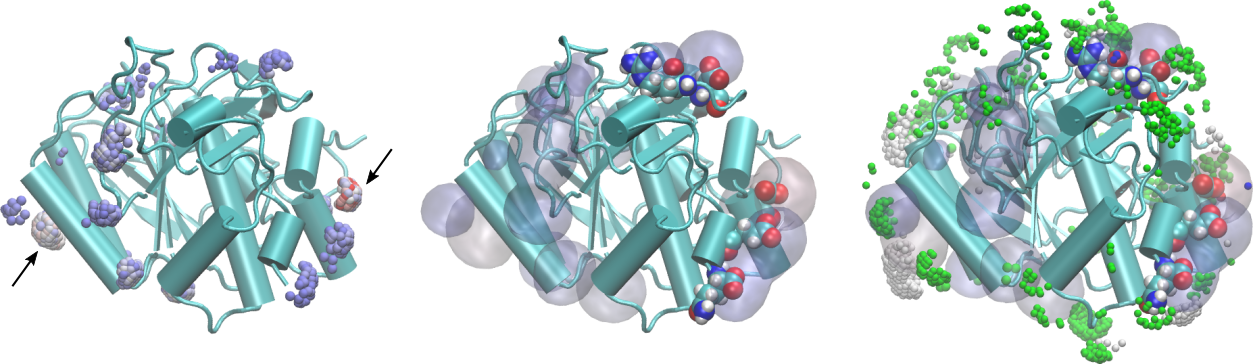
A short tutorial video showing how to open the input and output PDB files in VMD and produce images of the density is available here: