2D density maps
- The
ResidueContributionsobject - Contributions of subgroups of residues
- Indexing, slicing, arithmetic operations
- Saving and loading a ResidueContributions object
The ResidueContributions object
One nice way to visualize the accumulation or depletion of a solvent around a macromolecule (a protein, for example), is to obtain a 2D map of the density as a function of the distance from its surface. For example, in the figure below the density of a solute (here, Glycerol), in the neighborhood of a protein is shown:
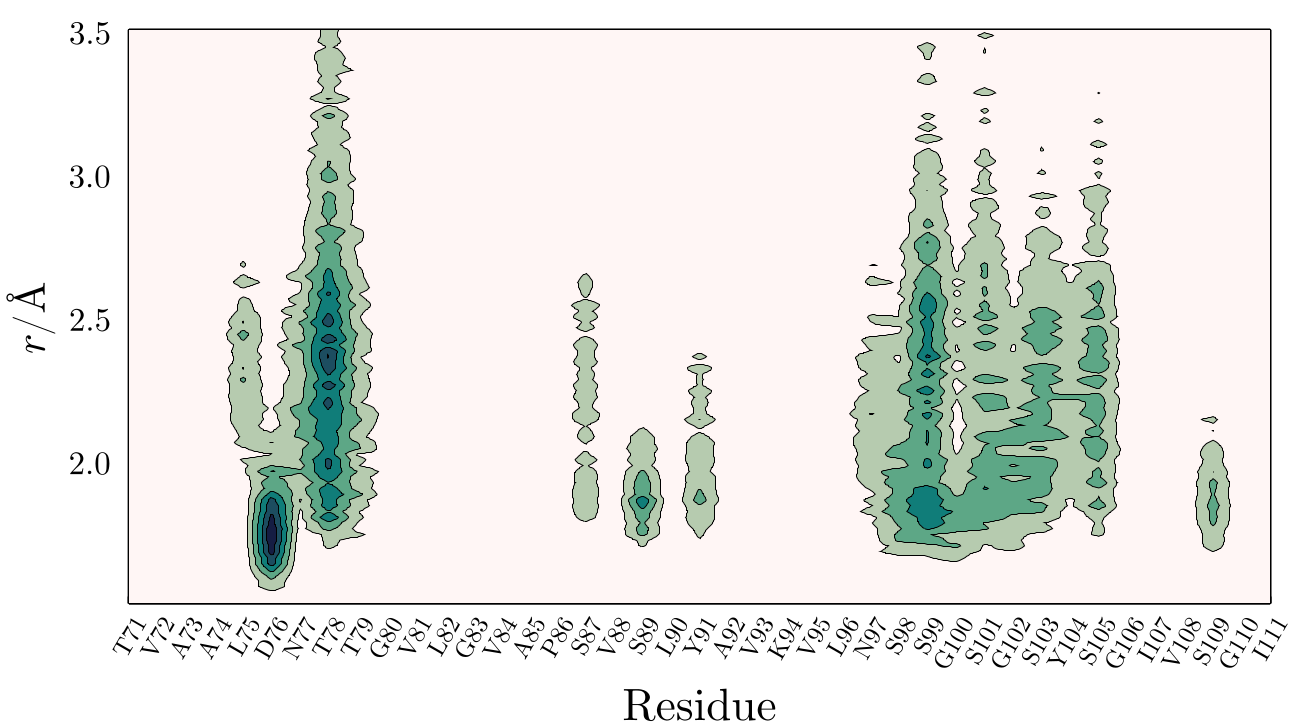
Here, one can see that Glycerol accumulates on Asp76 and on the proximity of hydrogen-bonding residues (Serine residues mostly). This figure was obtained by extracting from atomic contributions of the protein the contribution of each residue to the MDDF, coordination numbers or minimum-distance counts.
The computation of the contributions of each residue can be performed with the convenience function ResidueContributions, which creates an object containing the contributions of the residues to the mddf (or coordination numbers, or minimum-distance counts), the residue names, and distances:
ComplexMixtures.ResidueContributions — Type
ResidueContributions (data structure)Constructor function:
ResidueContributions(
    results::Result, atoms::AbstractVector{<:PDBTools.Atom};
    dmin=1.5, dmax=3.5,
    type=:mddf,
    correction=:W7,
    normalization=:ganguly,
)
Compute the residue contributions to the solute-solvent pair distribution function. The function returns a ResidueContributions object that can be used to plot the residue contributions, or to perform arithmetic operations with other ResidueContributions objects.
Arguments
results::Result: The result object obtained from themddffunction.atoms::AbstractVector{<:PDBTools.Atom}: The vector of atoms of the solute, or a part of it.
Optional arguments
dmin::Float64: The minimum distance to consider. Default is1.5.dmax::Float64: The maximum distance to consider. Default is3.5.type::Symbol: The type of the pair distribution function (:mddf,:md_count,:coordination_number, or:kbi). Default is:mddf.correction::Symbolandnormalization::Symbol: Only used iftype=:kbi. The weight function and the reference density used to compute the KBI contributions, as inkbi. Defaults::W7and:ganguly.silent::Bool: Iftrue, the progress bar is not shown. Default isfalse.
A structure of type ResultContributions can be used to plot the residue contributions to the solute-solvent pair distribution function, using the Plots.contourf function, and to perform arithmetic operations with other ResidueContributions objects, multiplying or dividing by a scalar, and slicing (see examples below).
A ResidueContributions object can be saved to a JSON file using the save function, and loaded back using the load function.
Examples
Constructing a ResidueContributions object
julia> using ComplexMixtures, PDBTools

julia> using ComplexMixtures: data_dir; ComplexMixtures._testing_show_method[] = true; # testing mode

julia> atoms = read_pdb(data_dir*"/NAMD/Protein_in_Glycerol/system.pdb");

julia> results = load(data_dir*"/NAMD/Protein_in_Glycerol/protein_glyc.json");

julia> rc = ResidueContributions(results, select(atoms, "protein"); silent=true)

          Residue Contributions - 274 residues.
     3.51 █     █      █     █            █
     3.27 █              █   █
     3.03 █     █    █       █            █       █       █                █
     2.79 █    ██    █ █ █   █            █      ██          █        █    █
 d   2.55 █ █  ██    █ █ █   █            ██     ██ █  █  █  █  █     █    █
     2.31 █ █  ██    █ ███   █    ██      ██     ██ █  ██ █  ██ █     █    █
     2.07 █ █   █  █ █████   █    ██      ██     ██ █  ██ █  █ ██    █     █
     1.83 █   █ █  █ █████   █    ██      █      ██ █  ██    █ ██     █    █
     1.59
         A1      T33     T66     S98     S130    T162    A194    H226    G258


julia> save("residue_contributions.json", rc)
"ResidueContributions saved in JSON file: residue_contributions.json"

julia> rc = load("residue_contributions.json", ResidueContributions);
Plotting
using ComplexMixtures, PDBTools, Plots
...
result = mddf(trajectory_file, solute, solvent, options)
rc = ResidueContributions(result, select(atoms, "protein"))
contourf(rc) # plots a contour map
Slicing
A slice of the residue contributions returns a new ResidueContributions object with the selected residues:
using ComplexMixtures, PDBTools, Plots
...
result = mddf(trajectory_file, solute, solvent, options)
rc = ResidueContributions(result, select(atoms, "protein"))
rc_range = rc[10:50] # slice the residue contributions
contourf(rc_range) # plots a contour map of the selected residues
Single-residue contributions
When the contributions of a single residue are computed, or a single-residue contribution is retrieved from a ResidueContributions object, the indexing and iteration over that object occurs over the contributions of that residue:
using ComplexMixtures, PDBTools, Plots
...
result = mddf(trajectory_file, solute, solvent, options)
rc = ResidueContributions(result, select(atoms, "protein"))
rc60 = rc[60] # contributions of residue 60 only
# index and iterate over the contributions of residue 7
rc60[1] # contribution at the first distance (equivalent to first(rc60))
rc60[end] # contribution at the last distance (equivalent to last(rc60))
count(>(0.01), rc60) # number of distances with contributions greater than 0.01
findmax(rc60) # index and value of maximum contribution
This is particular useful to retrieve the contributions from all residues at a given distance:
rc = ResidueContributions(result, select(atoms, "protein"))
rc_last_distance = [ c[end] for c in rc ]
# or, equivalently
rc_last_distance = last.(rc)
# index and value of maximum contribution at each distance, for all residues
findmax.(rc60)
Arithmetic operations
using ComplexMixtures, PDBTools, Plots
...
# first simulation (for example, low temperature):
result1 = mddf(trajectory_file1, solute, solvent, options)
rc1 = ResidueContributions(result1, select(atoms, "protein"))
# second simulation (for example, high temperature):
result2 = mddf(trajectory_file2, solute, solvent, options)
rc2 = ResidueContributions(result2, select(atoms, "protein"))
# difference of the residue contributions between the two simulations:
rc_diff = rc2 - rc1
contourf(rc_diff) # plots a contour map of the difference
# multiply and divide by scalars
rc3 = 3 * rc1
rc4 = rc2 / 2The output of ResidueContributions is by default shown as a simple unicode plot:
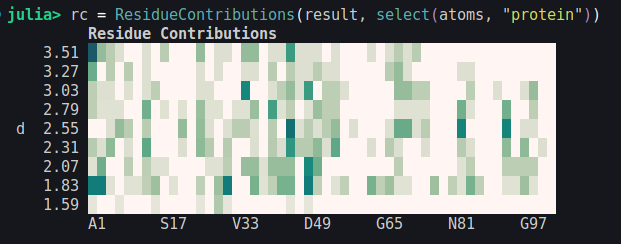
The ResidueContribution object can be used to produce a high-quality contour plot using the Plots.contourf (or contour, or heatmap) function:
Plots.contourf — Method
contourf(
    rc::ResidueContributions;
    step::Int=1,
    oneletter=false,
    xlabel="Residue",
    ylabel="r / Å",
    kargs...
)
contour(rc::ResidueContributions; kargs...)
heatmap(rc::ResidueContributions; kargs...)
Plot the contribution of each residue to the solute-solvent pair distribution function as a 2D density map. This function requires loading the Plots package. The calling syntax for contour and heatmap is the same as for contourf.
Arguments
rc::ResidueContributions: The residue contributions to the solute-solvent pair distribution function, as computed by theResidueContributionsfunction.
Optional arguments
step: The step of the residue ticks in the x-axis of the plot. Default is 1 or will be set to show at most 50 ticks labels.oneletter::Bool: Use one-letter residue codes. Default isfalse. One-letter codes are only available for the 20 standard amino acids.xlabelandylabel: Labels for the x and y axes. Default is"Residue"and"r / Å".
This function will set color limits and choose the scale automatically. These parameters can be set with the clims and color arguments of Plots.contourf. Other plot customizations can be done by passing other keyword arguments to this function, which will be passed to Plots.contourf.
Example
julia> using ComplexMixtures, Plots, PDBTools

julia> results = load("mddf.json")

julia> atoms = read_pdb("system.pdb", "protein")

julia> rc = ResidueContributions(results, atoms; oneletter=true)

julia> plt = contourf(rc; step=5)
This will produce a plot with the contribution of each residue to the solute-solvent pair distribution function, as a contour plot, with the residues in the x-axis and the distance in the y-axis.
To customize the plot, use the Plot.contourf keyword parameters, for example:
julia> plt = contourf(rc; step=5, size=(800,400), title="Title", clims=(-0.1, 0.1))A complete example of its usage can be seen here.
Contributions of subgroups of residues
Residue contributions can also be computed for subgroups of the residues. For example, as a continuation of the protein in glycerol example , one can compute the map of residue contributions, but splitting the contributions of backbone and side-chains of the residues:
rc_bb = ResidueContributions(
  results,
  select(protein, "backbone and resnum >= 70 and resnum <= 110")
)
rc_st = ResidueContributions(
  results,
  select(protein, "sidechain and resnum >= 70 and resnum <= 110")
)
And we plot the difference between these two maps:
using Plots
contourf(rc_st - rc_bb; oneletter=true)
obtaining the following figure:
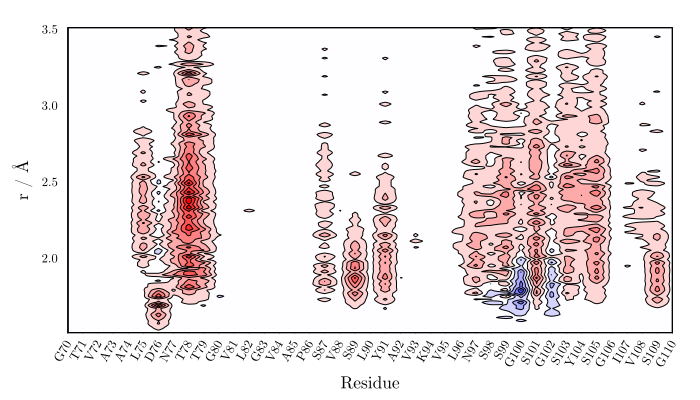
which shows that the side-chains contribute mostly to these densities, except, as expected, for some Gly residues.
Indexing, slicing, arithmetic operations
The ResidueContributions object can be indexes and sliced, for the analysis of the contributions of specific residues or range of residues:
rc = ResidueContributions(results1, select(atoms, "protein"));
rc_7 = rc[7] # contributions of residue 7
rc_range = rc[20:50] # contributions of a range of residues
Slicing will return a new ResidueContributions object.
Additionally, these ResidueContributions objects can be subtracted, divided, summed, or multiplied, to compare contributions of residues among different simulations. Typically, if one wants to compare the solvation of residues in two different simulations, one can do:
# first simulation (for example, low temperature)
rc1 = ResidueContributions(results1, select(atoms, "protein"));

# second simulation (for example, high temperature)
rc2 = ResidueContributions(results2, select(atoms, "protein"));

# difference in residue contributions to solvation
rc_diff = rc2 - rc1

# Plot difference
using Plots
contourf(rc_diff; title="Density difference", step=2, colorbar=:left)
Which will produce a plot similar to the one below (the data of this plot is just illustrative):
which will return a new ResidueContributions object.
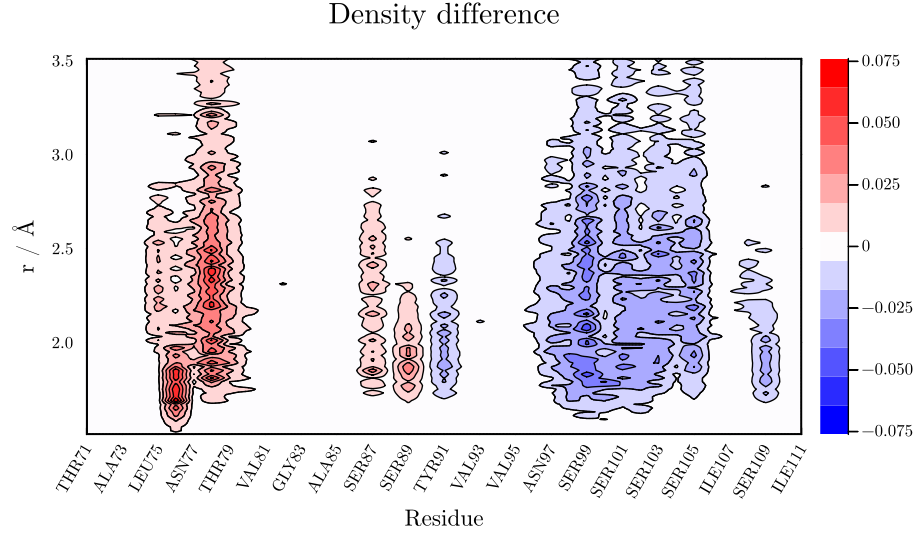
Finally, it is also possible to renormalize the contributions by multiplication or division by scalars,
rc2 = rc / 15
rc2 = 2 * rc
When the contributions of a single residue are computed, or a single-residue contribution is retrieved from a ResidueContributions object, the indexing and iteration over that object occurs over the contributions of that residue:
using ComplexMixtures, PDBTools, Plots
...
result = mddf(trajectory_file, solute, solvent, options)
rc = ResidueContributions(result, select(atoms, "protein"))
rc7 = rc[7] # contributions of residue 7
# iterate over the contributions of residue 7
rc7[1] # contribution of the first distance
rc7[end] # contribution of the last distance
This is particular useful to retrieve the contributions from all residues at a given distance:
rc = ResidueContributions(result, select(atoms, "protein"))
rc_last_distance = [ r[end] for r in rc ]
# or, equivalently
rc_last_distance = last.(rc)
# compute the maximum contribution of each residue:
max_c = maximum.(rc)
Saving and loading a ResidueContributions object
The ResidueContributions object can be saved and loaded for easier data analysis. In particular, this is important for very large structures, where its computation can be costly. The saving and loading functions can be use with:
rc = ResidueContributions(results1, select(atoms, "protein"));
# Save rc object to a file (json format):
save("residue_contributions.json", rc)
# Load json file into a new rc_loaded object:
rc_loaded = load("residue_contributions.json", ResidueContributions)
Note that the load function requires, as a second argument, the ResidueContributions type, to differentiate the method from the loading of the Result data structure.
MolSimToolkitShared.load — Method
load(filename::AbstractString, ResidueContributions)Function to load the residue contributions saved into a JSON file into the ResidueContributions data structure.
Example
using ComplexMixtures
rc = ResidueContributions(results, SoluteGroup(protein))
save("residue_contributions.json", rc)
rc = load("residue_contributions.json", ResidueContributions)MolSimToolkitShared.save — Method
save(filename::AbstractString, rc::ResidueContributions)Save the ResidueContributions object to a JSON file.
using ComplexMixtures
rc = ResidueContributions(results, SoluteGroup(protein))
save("residue_contributions.json", rc)
rc = load("residue_contributions.json", ResidueContributions)These ResidueContributions methods are convenience functions only.
Basically, we are extracting the contribution of each residue independently and building a matrix where each row represents a distance and each column a residue. Using PDBTools, this can be done with, for example:
residues = collect(eachresidue(protein))
residue_contributions = zeros(length(R.d),length(residues))
for (i,residue) in pairs(residues)
  c = contributions(results, SoluteGroup(residue))
  residue_contributions[:,i] .= c
end
The above produces a matrix with a number of columns equal to the number of residues and a number of rows equal to the number of MDDF points. That matrix can be plotted as a contour map with adequate plotting software.