Dihedrals and Ramachandran plots
Dihedral angles can be computed with the dihedral function, and an application of this function is the computation of Ramachandran plots.
MolSimToolkitShared.dihedral — Function
dihedral(at1::Atom, at2::Atom, at3::Atom, at4::Atom)Computes the dihedral angle given four atoms of type PDBTools.Atom.
Example
julia> using PDBTools

julia> pdb = read_pdb(PDBTools.TESTPDB);

julia> C1 = pdb[11]; N2 = pdb[13]; CA2 = pdb[15]; C2 = pdb[22];

julia> phi = dihedral(C1, N2, CA2, C2)
-36.70359f0PDBTools.Ramachandran — Type
Ramachandran(prot::AbstractVector{<:PDBTools.Atom})
Ramachandran # type
The Ramachandran function receives a vector of atoms of a protein and and returns a Ramachandran object, with two fields phi and psi, containing the lists of corresponding angles, that is:
- phi: C(-1) - N - CA - C
- psi: N - CA - C - N(+1)
If any of the above atoms is missing, the function errors. The residues are expected to belong to a single chain and consecutive.
The resulting Ramachandran object can be plotted with the Plots.scatter function.
Example
julia> using PDBTools

julia> prot = read_pdb(PDBTools.TESTPDB, "protein");

julia> ram = Ramachandran(prot)
Ramachandran data: phi, psi vectors with 102 angles.
Plots.scatter — Method
scatter(ram::Ramachandran; kargs...)Creates a Ramachandran plot given a Ramachandran object.
Arguments
ram::Ramachandran: the Ramachandran object, containing ϕ and ψ angles, resulting from the theRamachandanfunction.
All other arguments are default keywords of Plots.scatter and can be adjusted to customize the plot.
Example
julia> using PDBTools, Plots

julia> prot = read_pdb(PDBTools.TESTPDB, "protein");

julia> ram = Ramachandran(prot)
Ramachandran data: phi, psi vectors with 102 angles.

julia> # plt = scatter(map) # uncomment to plotDihedral angles
The dihedral function computes the dihedral angle given four atoms:
julia> using PDBTools

julia> prot = read_pdb(PDBTools.TESTPDB, "protein");

julia> dihedral(prot[1], prot[5], prot[11], prot[13])
64.07296f0
Ramachandran plot
The Ramachandran function and object are used to compute and plot Ramachandran plots for a protein structure. The call to Ramachandran(vec) where vec is a vector of Atoms returns a Ramachandran object, with fields phi and psi, containing the list of dihedral angles:
using PDBTools
prot = read_pdb(PDBTools.TESTPDB, "protein");
ram = Ramachandran(prot)
Ramachandran data: phi, psi vectors with 102 angles.Given the ram::Ramachandran object, the scatter function from Plots can be used to produce the Ramachandran plot:
using Plots
scatter(ram)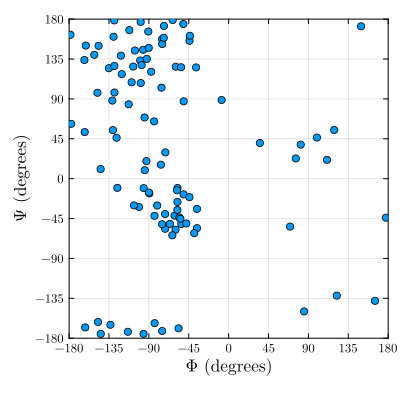
All scatter parameters can be customized using the Plots keyword syntax.
Check the stereochemistry of protein residues
PDBTools.zeta — Function
zeta(r::Residue)Computes the Cα chirality (zeta "virtual" torsion angle - Cα-N-C-Cβ).
Returns the torsion angle or NaN if the residue is not recognized a protein residue or if its a Gly residue. Expected values are 33.9 ± 3.5 degrees (for one standard deviation). Also see the zeta_check function.
Example
julia> using PDBTools

julia> protein = select(read_pdb(PDBTools.TESTPDB), "protein");

julia> residues = collect(eachresidue(protein));

julia> zeta(residues[1])
33.67202f0PDBTools.zeta_check — Function
zeta_check(r::Residue; nsigma=2)Checks if the Cα chirality falls into expected ranges. See the zeta function for further information. The expected mean is 33.9 degrees with a standard deviation of 3.5 degrees. By default, nsigma=2, implying that the function returns true if the torsion falls within two standard deviations from the mean.
See: https://www.ebi.ac.uk/thornton-srv/software/PROCHECK/manual/manappa.html
Example
julia> using PDBTools

julia> protein = select(read_pdb(PDBTools.TESTPDB), "protein");

julia> residues = collect(eachresidue(protein));

julia> zeta_check(residues[1])
true