Simulation
The Simulation object is the central data structure of MolSimToolkit. It holds the atom data, the trajectory file, and the current frame. Most analysis functions in MolSimToolkit accept a Simulation as their primary argument.
Iterating over frames
The standard way to process a trajectory is to iterate over all frames with a for loop:
using MolSimToolkit, MolSimToolkit.Testing, LazyArtifacts

sim = Simulation(test_file("popc_membrane.pdb"), test_file("popc_membrane.dcd"); first=2, step=2, last=4)

for frame in sim
    @show frame_index(sim)
    @show positions(frame)[1]
end
frame_index(sim) = 2
(positions(frame))[1] = [2.001203775405884, 7.035768985748291, 43.27251434326172]
frame_index(sim) = 4
(positions(frame))[1] = [-0.39684221148490906, 12.047886848449707, 37.44126892089844]The pairs iterator yields (frame_index, frame) tuples — useful when you need the actual frame number in the trajectory:
for (i, frame) in pairs(sim)
    @show i, frame_index(sim)
end
(i, frame_index(sim)) = (2, 2)
(i, frame_index(sim)) = (4, 4)enumerate yields (counter, frame) tuples — useful when you just need a sequential count:
for (i, frame) in enumerate(sim)
    @show i, frame_index(sim)
end
(i, frame_index(sim)) = (1, 2)
(i, frame_index(sim)) = (2, 4)Example: end-to-end distance
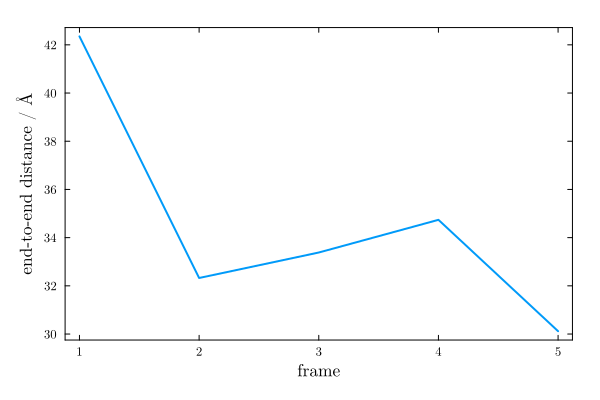
As a simple illustration, we compute the end-to-end distance of the protein (distance between the C$_\alpha$ atoms of the first and last residues) across all frames, applying periodic boundary conditions when wrapping the second atom position.
using MolSimToolkit, MolSimToolkit.Testing, LazyArtifacts
using PDBTools
using Plots: plot

sim = Simulation(test_file("popc_membrane.pdb"), test_file("popc_membrane.dcd"))

# Indices of the Cα atoms of the first and last residues
ats = get_atoms(sim)
protein_ca = findall(sel"protein and name CA", ats)
i1, i2 = first(protein_ca), last(protein_ca)

# Iterate over frames and compute end-to-end distances
end_to_end = Float64[]
for frame in sim
    p = positions(frame)
    p1 = p[i1]
    p2 = wrap(p[i2], p1, unitcell(frame))  # apply PBC
    push!(end_to_end, distance(p2,  p1))
end

end_to_end
5-element Vector{Float64}:
42.350696430918255
32.32651865283743
33.38388339753901
34.739990657172726
30.118298361705577We can plot the result as a function of the frame number:
plot(MolSimStyle,
    frame_range(sim), end_to_end;
    xlabel="frame",
    ylabel="end-to-end distance / Å",
    label=nothing,
)
Creating a Simulation
MolSimToolkit.Simulation — Type
Simulation(pdb_file::String, trajectory_file::String; frames=[1,2,3,5], unitcell=nothing)
Simulation(pdb_file::String, trajectory_file::String; frames=9:2:20, unitcell=nothing)
Simulation(pdb_file::String, trajectory_file::String; first=1, last=nothing, step=1, unitcell=nothing)
Simulation(pdb_file::String, trajectory_file1::String, trajectory_file2::String, ...; kargs...)
Simulation(pdb_file::String, trajectory_files::AbstractVector{<:AbstractString}; kargs...)
Simulation(atoms::AbstractVector{<:AtomType}, trajectory_file::String; kargs...)
Simulation(atoms::AbstractVector{<:AtomType}, trajectory_file1::String, trajectory_file2::String, ...; kargs...)
Simulation(atoms::AbstractVector{<:AtomType}, trajectory_files::AbstractVector{<:AbstractString}; kargs...)
Creates a new Simulation object.
The first argument defines the atoms of the simulation, and can be:
pdb_file: the name of a PDB or mmCIF file. The atoms are read withPDBTools.read_pdb, and will be of typePDBTools.Atom.atoms: a vector of atoms. This is useful when the atoms are provided by a different source than a PDB file, or were modified after being read. The atom type is not restricted toPDBTools.Atom: other atom types are supported, if theMolSimToolkit.atomic_mass(::AtomType)function is defined for the atom type. In this casepath_pdb(simulation)returnsnothing.
The following arguments are the trajectory files. More than one trajectory file can be provided, either as additional arguments or as a vector of file names. The files are considered sequential parts of the same simulation: frames are numbered continuously across files, in the order the files were given, and all analyses can be performed on the concatenated trajectory. All files must contain the same number of atoms.
The keyword arguments kargs... are the same for all constructors.
The frames or first, last, and step arguments can be used to specify the frames to be iterated over:
framescan be a vector of frame indices, e. g.,frames=[1,2,3,5]orframes=9:2:20.first,last, andstepare Integers that specify the frames to be iterated over. Iflastis not specified, the last frame in the trajectory will be used.
By default, the unit cell of each frame is read from the trajectory file. The unitcell keyword sets a fixed unit cell, which will be used for all frames, ignoring the unit cell of the trajectory (useful for trajectories without unit cell information, or of constant-volume simulations):
unitcell=true: use the unit cell of the PDB file (or of theatoms, if they are aPDBTools.Structurewith a unit cell).unitcell=uc: use the unit celluc, aUnitCellobject, which can be created from the sides of an orthorhombic box, the matrix of lattice vectors, or the lattice parameters (see theUnitCelldocumentation of PDBTools). Other values are converted withUnitCell(uc), e. g.unitcell=[10.0, 10.0, 10.0].
A Simulation object contains a trajectory file and a PDB data of the atoms. It can be iterated over to obtain the frames in the trajectory. The Simulation object is a mutable struct that contains the following data, that can be retrieved by the corresponding functions:
frame_range(::Simulation): the list of frames to be iterated overframe_index(::Simulation): the index of the current frame in the trajectorylength(::Simulation): the number of frames to be iterated over in the trajectory file, considering the current rangeraw_length(::Simulation): the number of frames in the trajectory fileget_atoms(::Simulation): get the atoms of the simulation, with the positions and unit cell of the current frame, as aPDBTools.Structure.unitcell(::Frame): the unit cell of a frame (unitcell(current_frame(simulation))for the current frame).
The Simulation object can also be manipulated by the following functions:
close(::Simulation): closes the trajectory filerestart!(::Simulation): restarts the iteration over the trajectory file, current frame is the first frame.first_frame!(::Simulation): restarts the iteration over the trajectory file and places the current frame at the first frame in the trajectorycurrent_frame(::Simulation): returns the current frame in the trajectorynext_frame!(::Simulation): reads the next frame in the trajectory file and returns it. Moves the current frame to the next one.set_frame_range!(::Simulation; first, last, step): resets the range of frames to be iterated over.get_frame!(::Simulation, iframe): returns the frame at the given index in the trajectory.goto_frame!(::Simulation, iframe): similar toget_frame!, but returns theSimulationobject placed in the desired frame.
One important feature of the Simulation object is that it can be iterated over, frame by frame.
The pairs iterator can also be used to iterate over the frames, returning a tuple with the frame index and the frame itself.
The enumerate iterator can also be used to iterate over the frames, returning a tuple with the frame counter and the frame itself.
Examples
julia> using MolSimToolkit, MolSimToolkit.Testing, LazyArtifacts

julia> simulation = Simulation(
           test_file("popc_membrane.pdb"), test_file("popc_membrane.dcd");
           first = 2, step = 2, last = 4,
           # or frames = [2,4]
       );

julia> for frame in simulation
           @show frame_index(simulation)
           # show x coordinate of first atom
           @show positions(frame)[1].x
       end
frame_index(simulation) = 2
((positions(frame))[1]).x = 2.001203775405884
frame_index(simulation) = 4
((positions(frame))[1]).x = -0.39684221148490906

julia> for (i, frame) in pairs(simulation)
           @show i, frame_index(simulation)
       end
(i, frame_index(simulation)) = (2, 2)
(i, frame_index(simulation)) = (4, 4)

julia> for (i, frame) in enumerate(simulation)
           @show i, frame_index(simulation)
       end
(i, frame_index(simulation)) = (1, 2)
(i, frame_index(simulation)) = (2, 4)
MolSimToolkit.Trajectory — Type
TrajectoryStructure that contains the data stream of one or more trajectory files. If more than one file is provided, the files are considered sequential parts of the same trajectory, and the frames are indexed continuously across files.
All methods dispatching on Trajectory are considered internal.
Multiple trajectory files
A simulation split into several trajectory files (for example, sequential runs of the same system) can be loaded as a single Simulation, by providing all files in order:
sim = Simulation("system.pdb", "run1.xtc", "run2.xtc", "run3.xtc")
# or
sim = Simulation("system.pdb", ["run1.xtc", "run2.xtc", "run3.xtc"])
The frames are numbered continuously across files, so all functions and analyses operate on the concatenated trajectory. The frames, first, last, and step keyword arguments refer to this global frame numbering. All files must contain the same number of atoms.
From a vector of atoms
Instead of a PDB or mmCIF file name, the first argument can be a vector of atoms. This is useful when the atoms come from a different source, or were modified after being read (the atoms must be in the same order as in the trajectory files):
using MolSimToolkit, MolSimToolkit.Testing, LazyArtifacts
using PDBTools

atoms = read_pdb(test_file("popc_membrane.pdb"))
sim = Simulation(atoms, test_file("popc_membrane.dcd"))
Simulation
Atom type: PDBToolsBase.Atom{Nothing}
PDB file: -
Trajectory file: /home/runner/.julia/artifacts/86db7e8c748e1097601a090dcc7304f11dc08e7a/popc_membrane.dcd
Total number of frames: 5
Frames to consider: 1, 2, 3, 4, 5
Number of frames to consider: 5
Current frame: 1Multiple trajectory files can be given as well, as in Simulation(atoms, "run1.xtc", "run2.xtc"). Since there is no PDB file associated with the simulation, path_pdb returns nothing:
path_pdb(sim) === nothingtrueMoving around the simulation
The Simulation object keeps track of a current frame. The functions below allow you to navigate the trajectory without necessarily iterating over every frame.
MolSimToolkit.first_frame! — Function
first_frame!(simulation::Simulation)Restarts the trajectory buffer, and places the current frame at the first frame in the simulation frame range. Similar to restart!, but returning the Frame object.
Example
julia> using MolSimToolkit, MolSimToolkit.Testing, LazyArtifacts

julia> simulation = Simulation(test_file("popc_membrane.pdb"), test_file("popc_membrane.dcd"); first=3); # note first=3

julia> first_frame!(simulation)
Frame{Chemfiles.Frame} - first atom position: [7.346549034118652, 2.396179437637329, 40.05739974975586]

julia> frame_index(simulation)
3MolSimToolkit.current_frame — Function
current_frame(simulation::Simulation)Returns the current frame in the trajectory.
MolSimToolkit.next_frame! — Function
next_frame!(simulation::Simulation)Reads the next frame in the trajectory file and returns it. Moves the current frame to the next one in the range to be considered (given by frame_range(simulation)).
MolSimToolkit.goto_frame! — Function
goto_frame!(simulation::Simulation, iframe::Integer)Returns the simulation placed at the given index in the trajectory.
Example
julia> using MolSimToolkit, MolSimToolkit.Testing, LazyArtifacts, PDBTools

julia> sim = Simulation(test_file("popc_membrane.pdb"), test_file("popc_membrane.dcd"));

julia> goto_frame!(sim, 4)
Simulation
    Atom type: Atom{Nothing}
    PDB file: /home/leandro/.julia/artifacts/86db7e8c748e1097601a090dcc7304f11dc08e7a/popc_membrane.pdb
    Trajectory file: /home/leandro/.julia/artifacts/86db7e8c748e1097601a090dcc7304f11dc08e7a/popc_membrane.dcd
    Total number of frames: 5
    Frames to consider: 1, 2, 3, 4, 5
    Number of frames to consider: 5
    Current frame: 4
The goto_frame! function will read the frames in the trajectory until the desired frame is reached. This can be slow for large trajectories. If the required frame is before the current frame of the simulation, the simulation will be restarted. The simulation object is returned positioned in the required frame.
MolSimToolkit.get_frame! — Function
get_frame!(simulation::Simulation, iframe::Integer)Returns the frame at the given index in the trajectory, and places the trajectory at that frame.
Example
julia> using MolSimToolkit, MolSimToolkit.Testing, LazyArtifacts, PDBTools

julia> sim = Simulation(test_file("popc_membrane.pdb"), test_file("popc_membrane.dcd"));

julia> frame4 = get_frame!(sim, 4)
Frame{Chemfiles.Frame} - first atom position: [-0.39684221148490906, 12.047886848449707, 37.44126892089844]The get_frame! function will read the frames in the trajectory until the desired frame is reached. This can be slow for large trajectories. If the required frame is before the current frame of the simulation, the simulation will be restarted. The simulation object is returned positioned in the required frame.
MolSimToolkit.restart! — Function
restart!(simulation::Simulation)Restarts the iteration over the trajectory file, placing the simulation at the first frame. Similar to first_frame!, but returning the Simulation object.
MolSimToolkit.set_frame_range! — Function
set_frame_range!(simulation::Simulation; first=1, last=nothing, step=1)Resets the frame range to be iterated over. This function will restart the iteration of the simulation trajectory.
Querying the simulation
MolSimToolkit.frame_range — Function
frame_range(simulation::Simulation)Returns the list of frames to be iterated over.
MolSimToolkit.frame_index — Function
frame_index(simulation::Simulation)Returns the index of the current frame in the trajectory.
Base.length — Method
length(simulation::Simulation)Returns the number of frames to be iterated over in the trajectory file, considering the current frame range.
MolSimToolkit.raw_length — Function
raw_length(simulation::Simulation)Returns the number of frames in the trajectory file (or the total number of frames, if the simulation was built from multiple trajectory files).
PDBToolsBase.get_atoms — Function
get_atoms(atom::Atom)
get_atoms(atoms::AbstractVector{<:Atom})
Returns the atom or vector of atoms. This function provides a consistent interface for extracting atoms from various structural elements (Atom, Residue, Chain, Model, etc.).
Positional Arguments
atom::Atom: A singleAtomobject.atoms::AbstractVector{<:Atom}: A vector ofAtomobjects.
Returns
AtomorAbstractVector{<:Atom}: The input atom(s).
Example
julia> using PDBTools

julia> atoms = read_pdb(PDBTools.test_file("small.pdb"));

julia> get_atoms(atoms[1]) == atoms[1]
true

julia> get_atoms(atoms) == atoms
trueget_atoms(residue::Residue)Returns a view of the atoms that belong to the residue.
Positional Arguments
residue::Residue: AResidueobject.
Returns
SubArray{Atom}: A view of the atoms in the residue.
Example
julia> using PDBTools

julia> atoms = read_pdb(PDBTools.test_file("small.pdb"));

julia> residues = collect(eachresidue(atoms));

julia> res_atoms = get_atoms(residues[1]);

julia> length(res_atoms)
12get_atoms(chain::Chain)Returns a view of the atoms that belong to the chain.
Positional Arguments
chain::Chain: AChainobject.
Returns
SubArray{Atom}: A view of the atoms in the chain.
Example
julia> using PDBTools

julia> atoms = read_pdb(PDBTools.test_file("chains.pdb"));

julia> chains = collect(eachchain(atoms));

julia> chain_atoms = get_atoms(chains[1]);

julia> length(chain_atoms)
48get_atoms(segment::Segment)Returns a view of the atoms that belong to the segment.
Positional Arguments
segment::Segment: ASegmentobject.
Returns
SubArray{Atom}: A view of the atoms in the segment.
Example
julia> using PDBTools

julia> atoms = read_pdb(PDBTools.test_file("dimer.pdb"));

julia> segments = collect(eachsegment(atoms));

julia> seg_atoms = get_atoms(segments[1]);

julia> length(seg_atoms)
1905get_atoms(model::Model)Returns a view of the atoms that belong to the model.
Positional Arguments
model::Model: AModelobject.
Returns
SubArray{Atom}: A view of the atoms in the model.
Example
julia> using PDBTools

julia> atoms = wget("8S8N");

julia> models = collect(eachmodel(atoms));

julia> model_atoms = get_atoms(models[1]);

julia> length(model_atoms)
234get_atoms(simulation::Simulation)Returns the atoms of the simulation, with the positions of the current frame, as a PDBTools.Structure carrying the unit cell of the current frame (nothing if the system is not periodic).
The unit cell is thus written by PDBTools.write_pdb, and used by the PDBTools functions that support periodic boundary conditions with unitcell=true.
MolSimToolkit.path_pdb — Function
path_pdb(simulation::Simulation)Returns the path to the pdb file of the simulation.
MolSimToolkit.path_trajectory — Function
path_trajectory(simulation::Simulation)Returns the path to the trajectory file of the simulation. If the simulation was built from multiple trajectory files, returns a vector with the paths to all files.
Base.close — Method
close(simulation::Simulation)Closes the trajectory file.
Frames and positions
Each iteration step returns a Frame object. The functions below give access to atomic positions and the unit cell from a frame.
The unit cell of a frame is a UnitCell (the unit cell type of PDBTools), or nothing if the trajectory does not contain unit cell information. A fixed unit cell, used for all frames, can be set with the unitcell keyword of the Simulation constructor: unitcell=true uses the unit cell of the PDB file (CRYST1 field), and unitcell=uc uses the given UnitCell (see the PDBTools documentation for its constructors). The atoms returned by get_atoms are a PDBTools.Structure carrying the unit cell of the current frame, which is thus written by write_pdb and used by PDBTools functions that accept unitcell=true.
MolSimToolkit.Frame — Type
FrameStructure that contains the data of a trajectory frame.
Public interface:
positions(::Frame): returns an array of positions of atoms in the frame.unitcell(::Frame): returns theUnitCellobject of the frame (ornothing, if the system is not periodic).
The fields of Frame are considered internal and should not be accessed directly. Use the provided functions instead.
MolSimToolkit.Point3D — Type
Point3D{T}A point in 3D space with coordinates x, y, and z of type T.
PDBToolsBase.positions — Function
positions(atoms::AbstractVector{<:Atom}; selection)Returns the coordinates of the atoms. The input may be one atom (type Atom), a vector of atoms, or a Residue. The coordinates are returned as a vector of static vectors (from StaticArrays), more specifically as a Vector{SVector{3,Float64}}.
Examples
julia> using PDBTools, StaticArrays

julia> protein = wget("1LBD");

julia> positions(protein[1])
3-element SVector{3, Float64} with indices SOneTo(3):
 45.228
 84.358
 70.638

julia> positions(protein[1], as=SVector{3,Float32})
3-element SVector{3, Float32} with indices SOneTo(3):
 45.228
 84.358
 70.638

julia> positions(protein, "index <= 2")
2-element Vector{SVector{3, Float64}}:
 [45.228, 84.358, 70.638]
 [46.08, 83.165, 70.327]

julia> positions(protein, at -> at.resname == "ALA")
110-element Vector{SVector{3, Float64}}:
 [43.94, 81.982, 70.474]
 [43.02, 80.825, 70.455]
 [41.996, 80.878, 69.34]
 ⋮
 [-17.866, 84.088, 51.741]
 [-18.496, 83.942, 52.777]
 [-15.888, 82.583, 51.706]

julia> residues = collect(eachresidue(protein));

julia> positions(residues[1])
6-element Vector{SVector{3, Float64}}:
 [45.228, 84.358, 70.638]
 [46.08, 83.165, 70.327]
 [45.257, 81.872, 70.236]
 [45.823, 80.796, 69.974]
 [47.147, 82.98, 71.413]
 [46.541, 82.639, 72.662]
positions(frame::Frame)Return the positions of the atoms in a Frame as a Vector{Point3D{Float64}}.
This is the default way to access the positions of the atoms in a simulation.
Example
julia> using MolSimToolkit, MolSimToolkit.Testing, LazyArtifacts

julia> simulation = Simulation(test_file("popc_membrane.pdb"), test_file("popc_membrane.dcd"));

julia> positions(first_frame!(simulation))[1]
3-element Point3D{Float64} with indices SOneTo(3):
  5.912472724914551
 10.768872261047363
 28.277008056640625
MolSimToolkit.unitcell — Function
unitcell(frame::Frame)Returns the unit cell of the frame, as a UnitCell object (the unit cell type of PDBTools), or nothing if the frame does not have a unit cell (the system is not periodic).
If the Simulation was created with a fixed unit cell (with the unitcell keyword), that unit cell is returned for every frame.
Periodic boundary conditions
The functions for periodic boundary conditions (and other functions shared by the packages of the ecosystem, such as center_of_mass, rmsd and align) are defined in PDBToolsBase:
PDBToolsBase — Module
PDBToolsBaseCore data structures and input/output functions of PDBTools.jl. This is an infrastructure package: end users should use PDBTools.jl, which re-exports the public names defined here and contains the user documentation.
PDBToolsBase.wrap — Function
wrap(x, xref, unit_cell_matrix::SMatrix{N,N,T}) where {N,T}
wrap(x, xref, sides::AbstractVector)
Wraps the coordinates of point x such that it is the minimum image relative to xref. The unit cell may be given a a static matrix of size (N,N) or as a vector of length N.
PDBToolsBase.wrap_to_first — Function
wrap_to_first(x, unit_cell_matrix)Wraps the coordinates of point x such that the returning coordinates are in the first unit cell with all-positive coordinates. The unit cell has to be a matrix of size (N,N).
Example
julia> using PDBTools: wrap_to_first

julia> uc = [10.0 0.0 0.0; 0.0 10.0 0.0; 0.0 0.0 10.0]
3×3 Matrix{Float64}:
 10.0   0.0   0.0
  0.0  10.0   0.0
  0.0   0.0  10.0

julia> wrap_to_first([15.0, 13.0, 2.0], uc)
3-element Vector{Float64}:
 5.0
 3.0000000000000004
2.0Test files
The examples use the test files of the package, which are obtained with the test_file function of the MolSimToolkit.Testing module, available after using LazyArtifacts. They are not part of the package installation: they are downloaded the first time they are used.